Production · family-focused agentic OS Voice · Web · Mobile · Discord

One agent. Every surface.
A home that thinks for itself.

Skipper is an operating system for your home, built to make a busy household run with less friction. It tracks your goals and projects, plans your meals, fires your reminders, organizes what you research, keeps the calendar straight, watches the smart home, and quietly remembers everything that matters across every conversation.

20 first-class apps. Voice on every device. Integrates with Trello, Tastytrade, and Home Assistant. The longer you use it, the more useful it gets.

346
MCP Tools
20
First-Class Apps
40+
Routed Categories
4
Surfaces
15M
Daily Token Budget
206K
Lines of Code
~$1K
Built with AI
What it does for you

One assistant. Every part of running the house.

Skipper is built around the way a household actually works. It plans, organizes, watches, and remembers across people, devices, and conversations, so the things that matter don't fall through the cracks.

Plans your day & week

Goals, projects, tasks, reminders, schedules and a daily prioritize view that pulls from all of them. Three focus slots for what really matters today.

Runs the kitchen

Searchable recipe library, scaling, cooking mode, paste-to-parse via chat. Meal ideas from a tagged library: "low-effort, no Mexican, must use potatoes."

Manages the home

Smart-home control through Home Assistant, appliance tracking, household item locator, maintenance schedules, vehicle service records.

Researches for you

"Skipper, go research how Kalman filters get used in trend trading." Twenty minutes later you have a fully sourced markdown document linked to the right project, delivered to your Discord.

Remembers everything

Every conversation seeds a long-term memory. The longer you use it, the more it knows about you, your projects, and your preferences, and the more useful it gets.

Watches your investments

Live Tastytrade integration, multiple strategies, streaming TradingView indicator signals, and an intraday risk monitor that DMs you when the equity curve, news, or positions warrant attention.

Handles your inbox

Gmail rule engine, scheduled polling, and a chat-driven email tool that can compose, search, and triage, with every action logged per rule.

Talks to you anywhere

Discord DMs, the web app, the Android app, and always-on voice with wake-word. Same memory, same tools, same context. Pick whichever surface is closest.

Never lets a date slip

Reminders, schedules, nags, and calendar items all share one unified delivery layer: Discord, Pushover, and mobile push. Anti-spam cooldowns so notifications only fire when there's actually something new.

Voice

"Hey Skipper." Then everything just works.

The mobile app runs an always-on wake-word listener with a rolling pre-roll buffer. When it fires, you hear a chime. That's "I heard you," not "go ahead, start now." You can talk straight through it; the pre-roll covers the chime and the ephemeral-token mint.

01 / WAKE
Wake-word detection

Picovoice Porcupine on-device. No cloud listening. Configurable phrase (default: "Hey Skipper").

02 / CHIME
"Heard you" chime + pre-roll

Rolling buffer captures audio before and during the chime so users never need to wait.

03 / MINT
Ephemeral session token

Server mints a short-lived OpenAI Realtime API token. Separate billing key supported.

04 / TALK
24kHz duplex stream

gpt-realtime for thought + voice; Whisper-1 for transcript. Tool calls relayed via WebSocket.

05 / ACK
Tool acknowledgments

Every tool has an Ack: line like "Setting that reminder…" spoken while the call runs, then the actual result.

What makes it feel natural

The voice surface uses the same agent loop as web and Discord. Same memory, same tools, same context. Switch apps with "open the recipes app"; the voice session re-scopes its tools to that app's category set automatically.

Compact alias blocks in the system prompt help the realtime model lock onto callable targets (recipes-app vs. recipes-tool vs. recipe-tool). Wake chimes, tool acks, and TTS all flow through one delivery layer so the audio never overlaps.

Mobile voice screen, active session
Mobile voice — active session, waveform, tool ack chipinfo-shots/voice-mobile-active.png
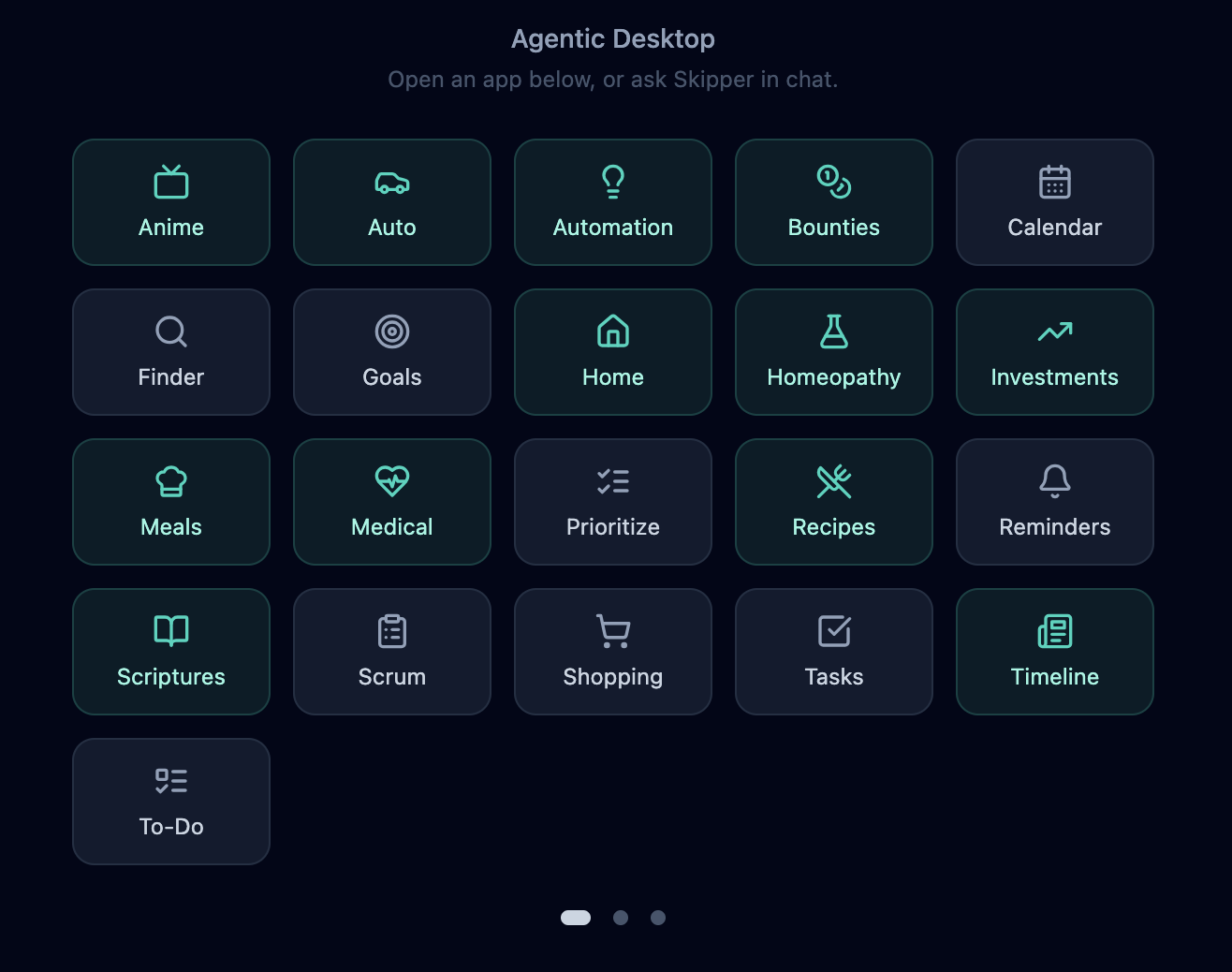
20 first-class apps

Every part of your household, one app away.

None of these are mockups. Each is a full app, with its own data model, its own UI, and its own chat-callable tools, addressable by name from anywhere. This is what's live today.

Goals · Projects · Tasks

Hierarchical task trees with arbitrary nesting. Kahn's-algorithm dependency-aware stack ranking. Per-entity auto-nags and Trello-board card linking.

Calendar & Schedules

Recurring schedules with RRULE support, auto-notifications, PM digest integration. Aggregates reminders, tasks, nags, and to-do into one view.

Brainstorm & Documents

Markdown editor with section-aware LLM enhancement and inline diff-aware revisions. CodeMirror 6, autocomplete, entity linking, full-text + vector search.

Timeline

Your personal family journal. Captures milestones, memories, and moments chronologically. Searchable, photo-aware, with entity links so you can revisit any chapter of family history.

Investments

Live Tastytrade integration, paper-trading backtests, 10+ strategies (BIL monthly, dual momentum, HMA, Kalman, RSI mean reversion, ML ARKK gate, Polygon ML).

Risk Management

Intraday risk domain. Every 15 min during market hours, LLM analyzes equity curve + news + positions and DMs hold / exit / re-enter recommendations.

Auto (Vehicle Mgmt)

Vehicles, service records, issues, valuations, conditions. MCP tools + REST + React detail UI with maintenance schedule integration.

Home

Automation, appliance tracking, insurance, with Home Assistant voice integration scoped per room.

Recipes

CRUD with categories, ratings, chef notes, image carousel, scaling, cooking mode. Paste-to-parse via chat. Generates standalone meal menus.

Email

Gmail OAuth, rule engine with activity log per rule, account/rule UI. Scheduled polling, action chains.

Finder & Locator

Household item locator with photo + location tracking. "Sticky" item history suggests where to file something on re-add.

Prioritize

3 focus slots with reorder / dismiss. Dynamic backlog auto-pulls from tasks, reminders, nags, auto issues, schedules, and to-do.

To-Do

Daily checklist with nudge delivery, calendar visibility, prioritize-backlog inclusion. Per-user.

Folders & Artifacts

Drop any file in a folder; the intelligence pipeline chunks, embeds, and fact-extracts so chat can recall it semantically.

Knowledge

Ingest URLs and docs, automatic chunking + embedding, semantic search, automatic injection during chat.

Newsletter & Research

Async research pipeline: Brave search → fetch → LLM summarize → synthesize document. Brave/Finnhub/TradingView signal feeds.

Print Runner

Markdown → HTML → PDF → physical printer (lpr). 4-step PDF fallback chain (weasyprint → Chrome headless → wkhtmltopdf → pandoc).

Notifications

Unified delivery to Discord DMs, Pushover, FCM mobile push, server channels. Anti-spam cooldowns per entity / issue type.

Anime & Player

Hosted library with pop-out HLS player (hls.js). Per-episode progress, watch state, queue management.

Thinking · Evolve · Jobs · Tools · System

Operator-grade views into the agent's background cognition, runtime tool authoring, job queues, and live system state.

Why 20 and not 5? Each app is a self-contained package. Drop a folder in apps/ with a manifest, and the platform discovers and wires it on startup. Per-app Postgres schemas, auto-mounted routes, auto-registered tools. See how →

The home screen

Everything in one place.

Skipper home screen — all apps in one view
Home screen — every app, one click awayinfo-shots/home-screen.png
Integrations

It plugs into the systems you already live in.

Every integration shares the same memory and the same agent loop. Mention a Trello card in a voice session and the Discord channel sees the same answer.

Discord

Native bot. DMs + channels. File attachments embed into context.

Trello

Live card sync (not cached). Checklists, labels, due dates, bidirectional delete.

Tastytrade

Token manager, order placement, positions, balances, paper backtests.

TradingView

Streaming webhook feed. Pine Script indicators push signals straight into Skipper's strategy runners in real time.

Home Assistant

Voice control for lights, scenes, and devices, scoped per room.

Gmail

OAuth2, scheduled polling, rule engine with action chains and activity log.

Firebase / FCM

Mobile push to Android. Auto registration on app launch.

Pushover

Mobile alerting fallback. Per-user channels. Critical-priority overrides.

Brave Search · Finnhub

Search + market data feeds powering the research and trading pipelines.

In the wild

Surfaces.

Save screenshots into web/info-shots/ with the slug filenames below. Each tile auto-swaps to your image as soon as the file exists. No HTML edit needed.

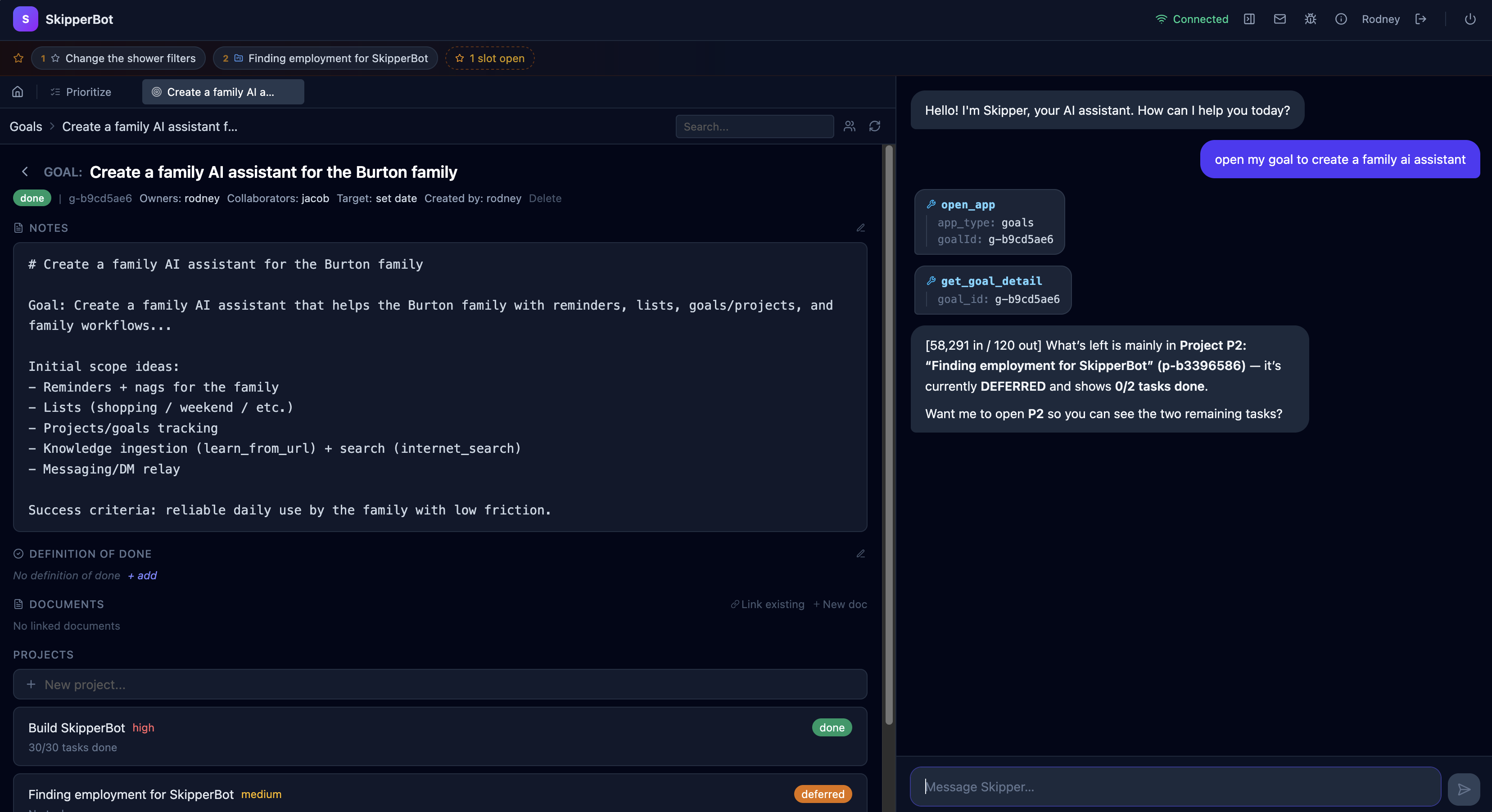
Web SPA, Goals app open, chat overlay active
Web SPA — Goals app open, chat overlay activeinfo-shots/goals-with-chat.png
Investment dashboard with strategy equity curves
Investment dashboard — strategy equity curvesinfo-shots/investments-equity-curves.png
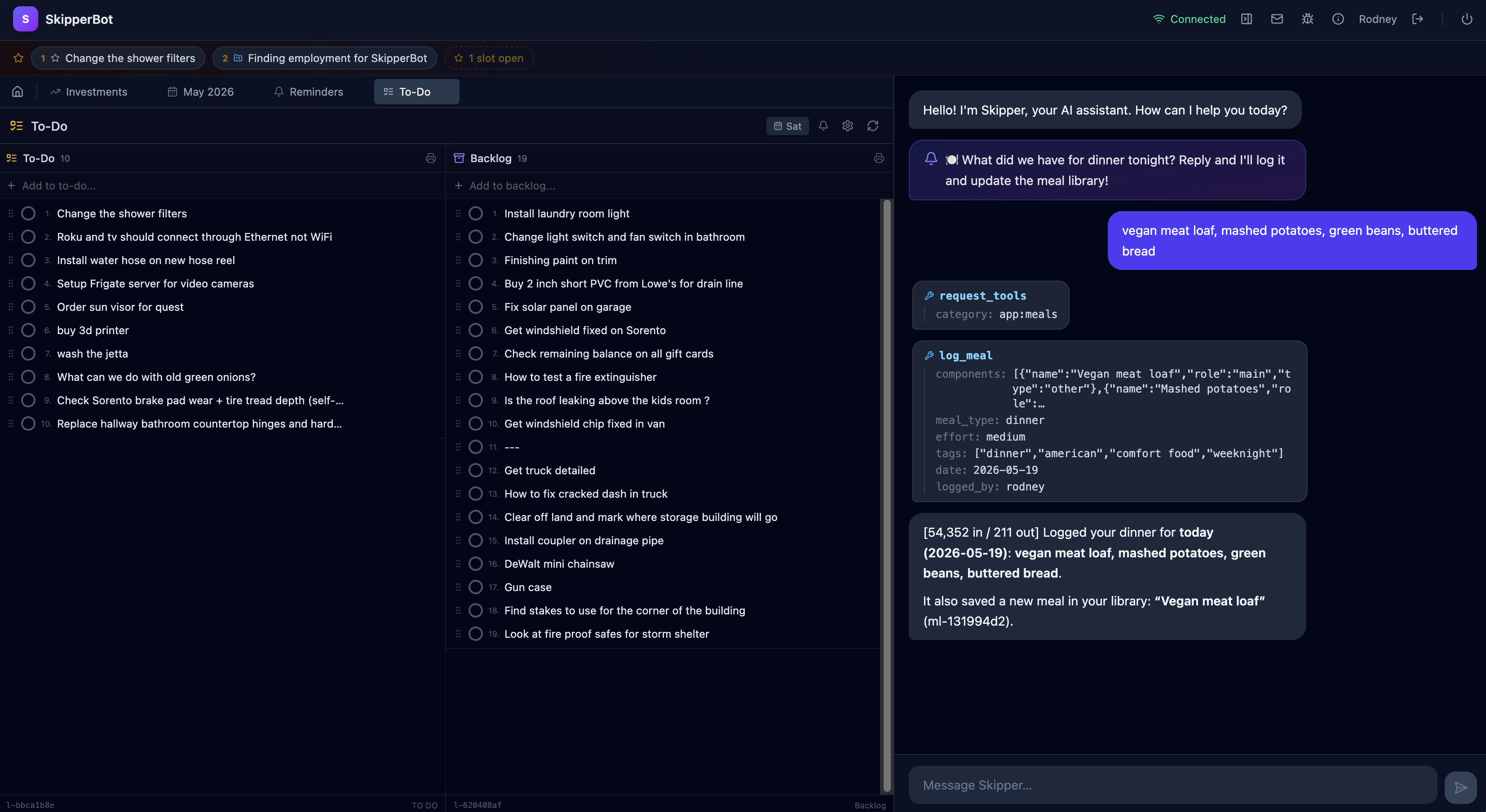
To-Do — daily checklist
To-Do — daily checklist with nudgesinfo-shots/todo-list.png
Voice session on Android
Android voice session — waveform + tool ackinfo-shots/voice-android.png
Brainstorm document with inline diff revisions
Brainstorm — inline diff revisions on a documentinfo-shots/brainstorm-diff.png
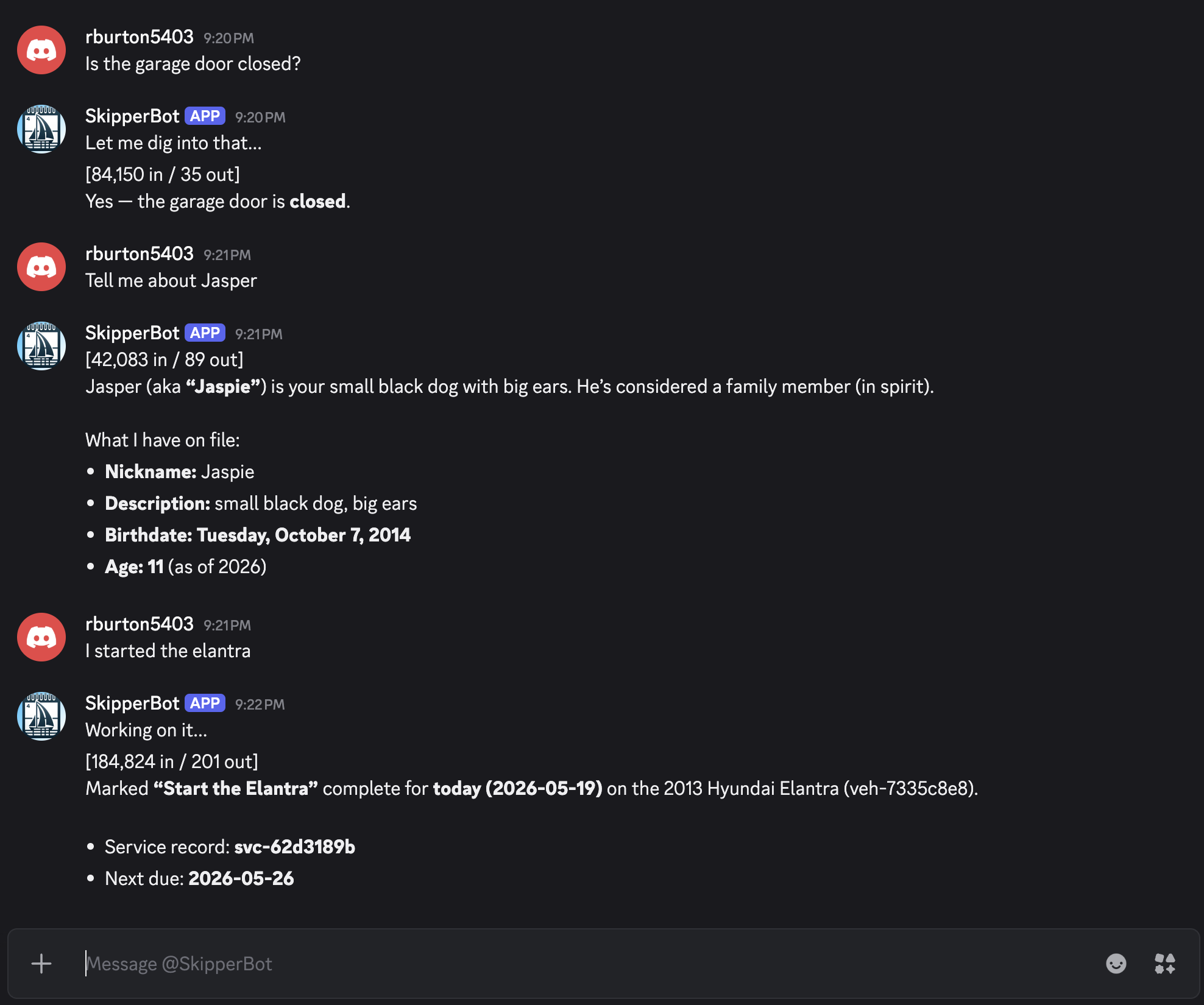
Discord DM with Skipper
Discord — DM with Skipperinfo-shots/discord-dm.png
Under the hood

How it actually works.

The rest of this page is the technical story: architecture, the tool router, memory pipeline, background engine, and the optimizations that make it cheap to run.

Architecture

Four surfaces. One brain.

FastAPI backend hosts the agent loop, the MCP tool registry, the data layer, and an SPA. A dedicated thinking scheduler runs background cognition. Postgres + pgvector stores everything. The same context is reachable from voice, web, mobile, and Discord.

Agent Loop
Voice (Realtime API)
Web SPA
Mobile (Kotlin)
Discord
MCP Tools
pgvector Memory

A real desktop, not a wrapper.

The React SPA is genuinely a windowed desktop. Goals, Documents, Recipes, Investments, the Calendar, the Locator: each a full app with its own routes and components. But every one of them can hand context to the agent with a click: "summarize this", "create a task from this", "remember this for next week."

Background cognition runs continuously on a separate thinking_scheduler with dynamic intervals (30s → 1h) and a shared 15M-token daily budget. Domains throttle themselves at 70% and 90% to stay polite.

Five long-running background loops keep the system alive: reminders, jobs (research / print / refinement), Trello live-sync, thinking, and the dispatcher.

Process isolation

The trading service runs on its own metal.

The Tastytrade integration isn't bolted into the agent process. It's a separate FastAPI service hosted on its own AWS EC2 instance, with its own database connection pool, its own APScheduler, its own webhooks, and its own strategy runners. It's authored in the same repo but deployed independently.

Why it matters: if the Skipper agent crashes, gets restarted, or is taken down for a deploy, positions stay tracked, strategies keep running, TradingView webhooks keep firing, and risk monitoring keeps watching the equity curve. Trading is a real-money domain. It doesn't sit behind a chat process.

The agent talks to it via a private API tunnel. From the user's perspective there's still one Investments app and one chat, but underneath, the two services have isolated failure domains.

# trading_service/ — separate process, separate host uvicorn trading_service.main:app \ --host 127.0.0.1 \ --port 8001 # Independent of skipperbot agent: # - own FastAPI app + lifespan # - own DB pool (positions, orders, runs) # - own APScheduler (strategy ticks, # market-hour windows, EOD jobs) # - own webhook receiver # (TradingView, Tastytrade) # - own .env, own logging, own crash domain # Hosted on AWS EC2. # Skipper agent crashes → trading keeps running. # Trading crashes → Skipper still works. # Either restarts independently.
Thinking domains

Skipper doesn't wait to be asked. It thinks.

Most AI tools are reactive: you ask, they answer, the lights go out. Skipper has a thinking framework: a runtime that lets it run autonomous cognitive loops in the background, each one observing, evaluating, and acting on its own rhythm. New responsibilities are added as new domains. This is the capability that turns the assistant into an agent.

The framework

A thinking domain is any responsibility worth running on a clock. Each one registers a handler that follows a strict observe → evaluate → act contract, then runs as its own concurrent asyncio task, independent of chat and independent of every other domain, but sharing the same brain, memory, and tools.

Critically, every cycle returns next_check_seconds. The domain controls its own rhythm based on what it found: busy → faster, idle → slower. Bounds are clamped to 30s through 1h so nothing spins or starves.

What makes it safe to leave running

  • Shared 15M-token daily budget across all domains. Standard-priority domains downgrade at 70%; low-priority ones pause at 90%.
  • Chat preemption. When you're talking to Skipper, timer domains defer. Your conversation always wins.
  • Per-domain locks. A domain never runs two cycles concurrently with itself.
  • Persistent state. Working memory and cursors live in Postgres. A crash mid-cycle resumes cleanly on restart.
  • Graceful shutdown. Supervisor stops new cycles, lets in-flight ones finish.
  • Model-tier selection. Each domain picks cheap / standard / expensive per cycle based on what's needed. Many cycles use the cheap model.
# Every domain implements one contract. async def handler(domain, budget_status) -> dict: # 1. OBSERVE — gather context cheaply ctx = _observe(domain) # 2. EVALUATE — should we even spend tokens? if ctx.is_idle or budget_status.critical: return {"next_check_seconds": 600, "model_used": "skip"} # 3. ACT — run the agent loop with # domain-specific tools + prompt result = await agent_loop.run( system=load_prompt(domain.name), user=_build_user_prompt(ctx), tools=_build_tools(domain, ctx), model=_pick_model(ctx, budget_status), ) # 4. REPORT — self-pace next wake-up return { "reasoning": result.text, "actions_taken": result.tool_calls, "tokens_used": result.tokens, "next_check_seconds": 30 if ctx.busy else 3600, }

What's running right now

These are the domains live today. The framework supports any number. Anything that benefits from running on a rhythm is just another registration.

PM (Project Manager)

Wakes up daily, picks the next project that needs review, loads its full state + history, runs LLM analysis, and DMs people about blockers, missing dates, and overdue work.

Memory

Drains the memory ingestion queue in batches of 10. Delegates each item to the right digester. Self-paces tight when queue is full, idles when empty.

Document

Every 30 min during active hours, reads accumulated memories with a cursor, filters noise, decides what's worth writing down, files markdown into a self-organizing folder tree.

Evolve

Self-improvement. Manages a persistent job tree of hundreds of focused LLM calls (cycle → phase → unit). Survives crashes and resumes from where it left off. See callout below.

Chat

The priority-0 domain. Each user message runs as one cycle: context assembly, retrieval, tool routing, agent loop, post-processing. The same framework as every other domain.

Per-goal domains g-*

Every goal Skipper owns spawns its own thinking domain named after the goal ID. Between conversations the handler loads the full goal context and quietly works on it: analyzing health, creating tasks, DMing collaborators, researching.

The wildest one · Evolve

Skipper improves itself.

The Evolve domain is a cycle manager that orchestrates hundreds of focused LLM calls against Skipper's own platform: its apps, tools, prompts, integrations, and specs. It reads its own architecture, identifies gaps, drafts fixes, files them as issues, even authors new tools at runtime.

Persistent job tree

Each evolve cycle decomposes into phases, each phase into units. All state lives in Postgres via the job queue. A server crash mid-cycle resumes from the next unit on restart.

Budget-aware

Pauses automatically if daily token spend gets high. Picks up tomorrow where it left off. The whole cycle can span days without anyone touching it.

Runtime tool authoring

Evolve can call create_tool / update_tool. And the resulting tool is registered live with the MCP server and immediately callable in the same session.

The point isn't this list. It's the framework. Anything that benefits from running on a rhythm (monitoring a feed, scanning for patterns, auditing data, drafting a report, learning from history) is just another domain registration. The thinking system is what makes Skipper an agent, not an assistant.

The app package platform

Apps are plugins. Adding one is dropping a folder.

Skipper is not a monolith with 20 hardcoded features. It's a runtime that discovers apps at startup and wires them into the agent, the API, the database, and the tool router automatically. Each app is a self-contained package. Adding a new domain is a manifest, not a refactor.

What's in an app package

Every app lives in apps/<id>/ and ships these files. Most are optional. The loader picks up whatever's present.

  • manifest.yaml. Id, name, entity types (with ID prefixes), tool category, keywords, behavioral guide pointer.
  • routes.py. A FastAPI APIRouter auto-mounted at /api/apps/<id>/.
  • tools.py. Every public function with a docstring is auto-registered as an MCP tool.
  • handlers.py. Event subscriptions, job handlers, thinking domain registrations.
  • migrations/. SQL files run in order against the app's own Postgres schema.
  • guide.md. Behavioral prompt the tool router injects when keywords match.
  • data.py. Data access layer (convention, not enforced).

Per-app schema isolation

Each app gets its own Postgres schema app_<id>. The loader validates that no cross-schema foreign keys exist. If app A's table tries to FK into app B's table, startup fails loudly. Apps communicate through events and the platform's link registry, never by reaching into each other's tables.

# apps/meals/manifest.yaml — abbreviated id: meals name: Meals version: "1.0.0" description: Meal idea generator + library. entity_types: - prefix: "ml" name: Meal table: meals - prefix: "mc" name: Meal Component table: meal_components tool_category: description: Browse and manage meals. keywords: - what's for dinner - meal ideas - low effort meal - something with chicken # apps/meals/tools.py def find_meals(filters: str) -> str: """Find meals matching filter criteria. ...""" ... # auto-registered as an MCP tool

The 11-step startup lifecycle

When the agent boots, the loader walks every package in apps/ and runs this lifecycle. If any step fails, the app is marked degraded but the agent keeps booting.

1 · Parse manifest

Load manifest.yaml; validate id, version, entity-type prefixes.

2 · Ensure schema

CREATE SCHEMA IF NOT EXISTS app_<id>. Each app gets its own.

3 · Run migrations

Apply unapplied SQL files in order. Tracked in app_migrations.

4 · Validate FKs

Reject any cross-schema foreign keys. Hard error on violation.

5 · Register entities

Entity-type prefixes (ml-*, mc-*) registered in the platform.

6 · Mark active

App row written to app_registry with version and status.

7 · Load tools

Each public function in tools.py with a docstring becomes an MCP tool.

8 · Mount routes

FastAPI router from routes.py mounted at /api/apps/<id>/.

9 · Build tool routes

Manifest's tool_category + keywords merged into the dynamic router.

10 · Wire events

Event-bus subscriptions declared in handlers.py registered.

11 · Register jobs & domains

Job handlers and thinking-domain registrations from the package activated.

→ App is live

Reachable from chat, voice, the SPA, Discord, and mobile. All without core code changes.

This is why there are 20 apps and not 5. New domains can be added by anyone who can write a manifest and a few Python functions. Including Skipper itself via the Evolve thinking domain, which authors tools and (eventually) full apps through this same framework. The platform isn't a feature of the product. It's the substrate the product runs on.

The Dynamic Tool Router

346 tools. Inject only what's needed.

If you stuff every tool schema into context, the model gets distracted and you pay for every token, every turn. Skipper's router scans the message for keywords and entity-ID patterns (g-*, p-*, t-*, sch-*, veh-*), picks the matching categories, and only those tool schemas are sent.

How it routes

Tools are organized into 40+ categories by domain. Reminders, recipes, investments, filesystem, memory, scheduling, and so on. 29 categories ship in the core tool_routes.json; each loaded app contributes another. Every category declares its tools, its keyword triggers, and per-tool acknowledgment templates ("Setting that reminder…") that the voice surface speaks before the call finishes.

Four meta-tools are always present: list_all_tools, request_tools, open_app, restart_agent. If the agent needs something outside the current set mid-turn, it just asks for it.

Behavioral guides in prompts/guides/ load on the same trigger. Talking about reminders? You get the reminders guide. Talking about goals? The goals guide. Nothing else.

# tool_routes.json — one of 40+ categories "reminders": { "description": "One-shot + recurring reminders", "tools": ["create_reminder", "list_reminders", "snooze", ...], "ack": { "create_reminder": "Setting that reminder...", "snooze": "Snoozing for {duration}..." }, "keywords": ["remind", "remember to", "in N minutes", ...] } # turn arrives: user: "remind me at 4 to call the vet" router: [reminders] → 6 tools, 1 guide router: // 340 other tool schemas stay home

A handful of the categories

Each is independently routable. Mixed messages can pull multiple categories.

core memory · notify
filesystem grep · cat · ls
reminders
scheduling
recipes
investments
tasks · goals
knowledge
documents
timeline
brainstorm
research
crontab
homeopathy
timer
printing
scrum
behavior
prioritize
link · folder
evolve self-modify
+ 8 more
Memory

Three layers. Background digestion. Semantic recall.

Memory is not a side-cache. It's the spine. Every CRUD operation, every conversation turn, every successful tool call seeds the long-term knowledge base. By the next conversation, Skipper already knows what changed.

Layer 1

Explicit Memories

The agent (or you) calls remember(content, tags, about). Tagged, entity-linked, full provenance back to the conversation turn that created it.

Layer 2

Auto Memories

Every entity CRUD writes an [auto]-tagged memory. recall(entity_id=t-abc) returns the full change history with zero work.

Layer 3

Post-Turn Digestion

After every chat turn, the conversation is enqueued. A cheap LLM extracts factual statements in the background. No latency added. And writes them as searchable memories. Knowledge compounds organically.

The memory pipeline

From memories to a self-organizing knowledge base.

Memories don't pile up in a flat table forever. Every chat turn and every app-record event drops a job onto the memory_ingestion_queue. A Postgres-backed work queue with entity-keyed dedup (a burst of updates to the same entity collapses to last-write-wins) and crash-safe stale-row recovery for items left "processing" after a restart.

Two thinking domains drain the queue in parallel, each on its own rhythm:

  • Memory domain. Dequeues batches of 10, delegates each item to the right digester (chat-turn or app-record), writes the resulting facts. Self-paces 30s → idle.
  • Document domain. Every 30 min during active hours, walks new memories with a cursor, filters out operational noise (~90% of rows), and feeds the survivors to an LLM that decides what to write down.

The result: a self-organizing folder tree of auto-documents. Topic indexes, reference cards, running narratives. Created and reorganized by the agent itself, readable by humans, all sitting inside the Folders app. Working memory persists between cycles so the domain remembers what it's already organized.

# memory_ingestion_queue — Postgres-backed, # entity-keyed dedup, crash-safe enqueue( source_type="chat_turn", payload={"turn_id": "c-...", ...}, entity_key="chat:c-...:turn", ) # ↓ drained by domain_memory.py # ↓ digested into memories # ↓ document domain reads them # Self-organizing folder tree Folders/ ├─ Health/ │ ├─ Supplement protocols.md │ └─ Lab results — running notes.md ├─ Trading/ │ ├─ Strategy reference index.md │ ├─ Risk decisions journal.md │ └─ Kalman filter — notes.md ├─ Home/ │ └─ Maintenance lessons.md └─ Topic index.md # Each doc evolves over time. The domain # decides when to create vs. update vs. # reorganize. Its own writes are tagged # saved_by="document_domain" so the next # cycle's pre-filter ignores them.

Embeddings & vector recall

OpenAI text-embedding-3-small (1536-dim). Stored binary-packed as float32 for compact disk + O(1) seeks. Postgres + pgvector for the index. Tag normalization (plurals → singular) means "memories" and "memory" both hit the same rows.

Recall is hybrid: cosine similarity narrows the pool, then tag / entity / author filters refine. On startup, missing embeddings backfill lazily so adding a new field never blocks a release.

Folder & Knowledge intelligence

Drop a document into a folder and a post-processing pipeline runs two passes: (1) chunk + embed for semantic search; (2) LLM fact extraction for structured recall. Web URLs go through the knowledge store with the same treatment.

# Recall is hybrid: semantic + filter memory_store.recall( query="what did I want to learn about Kalman filters", tags=["investing", "research"], entity_id="p-trading-strats", k=8 ) # Returns top-K vector matches, then filters. # Each result carries its provenance: # - source turn id (c-xxxx) # - tags, author, timestamp # - the original message context
Background engine

A real job system. Concurrent. Cancellable. Observable.

Skipper doesn't just respond. It runs work. A dedicated job dispatcher manages multiple types of long-running, asynchronous work behind the scenes. The runtime is the same whether the agent kicked off the job, you scheduled it, or a cron rule fired it.

The dispatcher

job_dispatcher.py is a handler-registry engine. Each job type registers a handler with a per-type concurrency limit. The dispatcher claims pending work from Postgres, runs handlers as asyncio tasks, and gives each one a live JobContext. Its own progress channel and cancellation flag.

A separate 30-second job runner loop polls multiple sources (research, refine, print, PM, schedule-triggered) and dispatches what's due. Five long-running loops total: reminders, jobs, Trello live-sync, thinking, dispatcher.

What makes it good

  • Per-type concurrency. Research can run 2 in parallel, investment runs serially. Per-handler ceilings keep CPU and API budgets sane.
  • Cooperative cancellation. Handlers poll is_cancelled() and bail cleanly. Mid-pipeline cancels are safe.
  • Live progress callbacks. Handlers call update_progress(pct, msg); the SPA streams it.
  • Per-job log capture. A custom JobLogHandler uses an asyncio ContextVar so concurrent jobs never leak log lines into each other's job_logs rows.
  • Configurable retry. Failed jobs retry per their own policy.
  • Graceful shutdown. request_shutdown() stops claiming new work and drains everything in flight.
# Register a handler — that's the whole API. register_handler("research", run_research, max_concurrent=2) register_handler("refine", run_refine, max_concurrent=2) register_handler("print", run_print, max_concurrent=1) register_handler("pm", run_pm, max_concurrent=1) register_handler("investment", run_invest, max_concurrent=1) # Submit from anywhere — chat, scheduler, web UI. submit_job("research", config={ "query": "Kalman filter applications in trend trading", "num_sources": 8, "tags": ["trading", "research"], "link_entity_id": "p-trading-strats", }) # Inside a handler: async def run_research(job, ctx): ctx.update_progress(10, "Searching the web...") if ctx.is_cancelled(): return ... ctx.update_progress(90, "Synthesizing doc...")

Job types running on the engine

Research

Web search → fetch → summarize → synthesize → DM. See deep-dive below.

Refine

Section-aware document revision. Diff-aware edits over existing research docs.

Print

Markdown → HTML → PDF → physical printer. 4-step fallback (weasyprint → Chrome headless → wkhtmltopdf → pandoc).

PM (Project Manager)

10 AM daily cycle. Scans goals/projects/tasks for missing dates, owners, blockers; per-project LLM analysis; grouped DM delivery.

PM Check-in

Lighter mid-day check between daily scrums. Flags status changes since the last cycle.

Investment

Strategy analysis pipeline. Runs the active trading strategies, logs equity curves, emits signals.

Schedule-triggered

Cron expressions + custom rules fire jobs on time-of-day, day-of-week, market-hours triggers.

Flagship · the research agent

"Skipper, go research how Kalman filters get used in trend trading."

You ask. It thinks. Twenty minutes later you have a fully sourced, cleanly written document linked to the right project, delivered to your Discord DM.

01 / PLAN
Query planner

SMART_MODEL strategizes. Splits the prompt into 1–N targeted search queries. No naive single-query fetches.

02 / SEARCH
Brave Search API

Configurable 1–20 results per query. Deduped across queries. Sources scored and ranked.

03 / FETCH
HTML → text extraction

Custom HTML parser strips boilerplate (nav, footer, sidebars, script, style). 20s timeout per page; failures skipped gracefully.

04 / SUMMARIZE
Per-source LLM digest

Each fetched page passes through an LLM with the original research question as context, producing a faithful per-source summary.

05 / SYNTHESIZE
Structured doc generation

All summaries fed to SMART_MODEL which writes a sectioned markdown document with citations and a reading-level appropriate to the request.

06 / DELIVER
Discord DM + entity linking

Document filed in Folders, tagged, optionally linked to a goal/project/task. DM auto-chunked at 2000 chars. Memory layer learns what you researched.

And it can revise itself.

A separate refine job type runs section-aware diffs against an existing research doc. "go deeper on the Kalman gain calculation, and add a section on numerical stability". Generating its own fresh queries, fetching new sources, and writing surgical revisions per section rather than rewriting the whole document. Diff-aware. Source-aware. Reversible.

Optimizations

Fast on purpose. Cheap by design.

Every part of the stack assumes scarce tokens, slow networks, and humans who notice latency.

Dynamic tool schema injection

~5–15 tool schemas per turn instead of 346. Token spend drops by orders of magnitude.

Direct-call tool dispatch

Tool calls bypass the MCP subprocess and run the Python function directly. Single-digit-ms overhead.

Background post-turn digestion

Memory extraction runs after the response ships. Zero added latency to the user-facing turn.

Shared daily token budget

15M tokens / day across thinking domains. Throttles at 70% (slow) and 90% (pause).

Dynamic domain intervals

Background loops self-pace 30s → 1h based on what they find. No fixed cron tax.

Binary-packed embeddings

float32 on-disk, O(1) seeks, lazy backfill on startup. New fields don't block releases.

Hybrid recall

Vector similarity narrows; tag / entity / author filters refine. Cheap and precise.

Voice pre-roll buffer

Audio recorded before/during the chime is prepended to the realtime request. No "wait for the beep."

Notification anti-spam

Per-entity, per-issue-type cooldowns (3 days default). The system stays quiet when it has nothing new.

Entity-ID stripping

Internal IDs preserved in chat history (for the agent) but stripped from user-facing output.

Compact alias blocks

Voice prompt includes condensed alias lookups so the realtime model resolves callable targets fast.

Topological stack ranking

Goals + projects + tasks ranked via Kahn's algorithm so blockers never end up below blockees.

Built with

The stack.

Backend

Python 3.12FastAPIasyncioWebSockets FastMCPPostgrespgvectorOpenAI API OpenAI Realtimediscord.pyPydanticRRULE / dateutil

Web

React 19ViteTailwindCSS 4CodeMirror 6 xterm.jsRechartsReact FlowHLS.js diff-match-patchreact-markdownPWA

Mobile

KotlinJetpack ComposePicovoice Porcupine Firebase MessagingOkHttpOpenAI Realtime SDK

Infra · Integrations

Trello APITastytrade APIGmail OAuth2 Home AssistantPushoverBrave Search FinnhubTradingView webhooksGoogle Drive backup ngrokweasyprint / pandoc
Built with AI

One developer. One thousand dollars. One agentic OS.

Everything on this page, from the 346 tools and 20 apps to voice, mobile, the isolated trading service, the thinking domains, and the auto-documentation pipeline, was designed, written, tested, and shipped by a single developer using Claude and OpenAI as co-developers. Total LLM API spend across both providers through the entire build: about $1,000.

This isn't a hypothetical about what AI could do. It's the receipt. A single contributor with AI as a force multiplier can now ship production-grade systems for what used to be one month's consulting bill. And this page exists partly to be the evidence. If you're hiring, investing, or evaluating: that's the actual data point.

The honest follow-up

Could anyone build this with AI?

Honest answer: no. Not without the engineering foundation underneath.

The $1,000 receipt above is real, but it isn't $1,000 of any spend. It's $1,000 spent by someone who has been building software for three decades. AI is a remarkable force multiplier, but it isn't a substitute for engineering judgment, system design, debugging instincts, or knowing when the AI is wrong.

Through this build I directed the AI thousands of times. I rejected suggestions, redirected approaches, caught architectural mistakes before they shipped, and made the hard calls about what not to build. Voice integration, the trading service process isolation, the thinking framework, the per-app schema validation, the cross-domain memory pipeline. None of those emerged from prompts alone. They came from knowing what kind of system would hold up over years of daily use.

What's changed is the labor: the typing, the boilerplate, the lookups, the routine glue code, the test scaffolding, the first-draft documentation. AI is genuinely fast at all of that. What hasn't changed is the thinking: knowing what to build, how to structure it, when to abstract and when not to, where the failure modes are, why a particular pattern matters at scale.

If AI is the multiplier, experience is what it multiplies. This page is the receipt for one. It would be a very different receipt for someone without the foundation.

Frequently asked

Can I get a copy?

Honest answer: not today. Skipper isn't packaged for distribution, and I haven't made any firm decisions yet about what comes next.

What's on the table:

  • Keep it for personal use. It runs my household and my trading. That's already a lot of value on its own.
  • Open-source the shareable pieces. The trading strategies stay proprietary, but the platform underneath. Agent loop, MCP wiring, the thinking framework, the memory + auto-doc pipeline. Could be useful to others.
  • Offer it as a SaaS. The household-OS layer could be productized for other families.
  • License the whole system to the right partner or investor.

Right now I'm focused on building something that actually fills my family's needs. And on learning and having fun with the technology while it's still this new. If any of the directions above interests you, the door's open.

Get in touch on LinkedIn
The point

This is what an agentic desktop looks like when one person builds it the whole way down.

Not a chat wrapper. Not a demo. A working operating system for a household, with 20 apps, 346 tools, 4 surfaces, live integrations, and a brain that thinks in the background and remembers what mattered yesterday. Built end-to-end. UI, agent loop, MCP server, mobile, voice, thinking scheduler, isolated trading service, the lot.